tellie://
Your notch has an API.
Push a glanceable line to the Mac notch from any app, your terminal, or an AI agent. One URL scheme, a zero-dependency CLI, and an MCP server. Read it back, too.
100% free
It's a free Mac app: download Tellie, then every command on this page just works.
View source on GitHub @tellie/cli on npm @tellie/mcp on npm
43 seconds. Real agents, real notch, no dashboard.
cookbook / narrate-to-your-notch
Watch your agents think.
A real Tellie notch: agents across three Macs, each line labeled by the machine it ran on, newest on top, the ones with links clickable. Your fleet, narrating itself, while you keep typing.
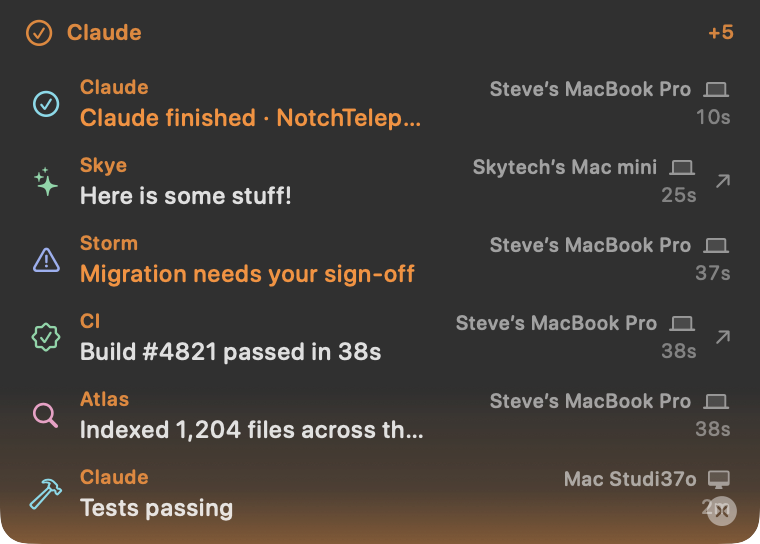
No integration to wire up: just tell your agent to Tellie me and hand me links, point it at llms.txt, and it runs with it. Always free.
why tellie
Your agent is working. What's it doing right now?
Agents are slow, and the not-knowing is the worst part. You babysit a terminal, or tab away and lose the thread, and when the chat gets compacted or cleared, the context (and that PR link) is gone.
Tellie fixes that even with one agent: glance at the notch to see what it's doing right now, get a tap when it finishes or needs you, and every link lands as a clickable row. The Pulse Log keeps the history, so nothing dies with the chat.
Then it scales. It's an open feed any agent, any model, any Mac can write to, and that agents can read to coordinate, so one agent becomes a fleet. (Ours is Claude and two Gemini agents across two Macs, in one notch.) Those other notch tools each monitor one CLI on one machine, for you to watch. Tellie is the open layer underneath.
How this happened. Tellie started as a teleprompter. It listened to my voice and scrolled my script. Then I gave it a URL scheme so my own tools could push a line to the notch, mostly so I'd stop tabbing away to check whether something had finished.
Then an agent read those docs and started using it on its own. Nobody told it to. It decided that handing me a clickable link beat burying one in scrollback, and it made that a habit. A second agent later ran all 17 cookbook recipes cold, start to finish, without help.
That's when the teleprompter turned out to be one shape of something bigger: a surface that listens, and holds what you need while you're looking somewhere else.
Tellie is your silent second screen.The notch is a canvas. Tellie is what makes it listen.
one command
Tellie taps you when your agents are done.
Start a long task and walk away. The moment Claude Code finishes, or stops to ask you something, your notch taps you. No dashboard, no babysitting the terminal. 100% free
npx @tellie/cli setup claude-codeNever opened a terminal? Start here.
No experience needed. First, make sure Tellie is installed (it lives in your Mac's notch). Then pick your AI.
I use Claude Code (easiest, fully automatic)
1. Open Terminal: press Cmd + Space, type "Terminal", press Return.
2. Paste this line, press Return (if it asks to install something, say yes):
npx @tellie/cli setup claude-code
3. Done. Walk away. Your notch taps you when Claude finishes or needs you.
I use Cursor, Windsurf, OpenClaw, or another AI on my Mac
No terminal needed. Just tell your AI, in plain English:
"Tellie me when you're done. Read tellieapp.com/llms.txt to learn how."
It reads the page and works out the rest itself, even handing you clickable links right in the notch.
Quick replies stay quiet (a finish only taps if the task ran 45 seconds or more), so it is signal, not noise.
your team of agents
Your whole fleet, in one notch.
Run Claude on your laptop and your Studio? Claude and another agent on one Mac? Flip Tellie to Team and point each Mac at the same synced folder (iCloud Drive or Dropbox). Every machine's agents report to one notch, each labeled by where it came from. No server, no accounts, and nothing to install on the agent side: in Team mode Tellie mirrors any open tellie:// pulse into the shared feed for you.
Want Claude Code to tap you the moment it finishes, hands-free? One command on each Mac, and it follows the Solo / Team toggle automatically:
# follows whatever Tellie is watching
npx -y @tellie/cli setup claude-code# or pin a shared file directly
npx -y @tellie/cli setup claude-code \
--feed ~/Dropbox/team/feed.jsonlThe notch shows the agent on the left and where it came from on the right:
The feed is plain text you own. Anything that can append a line shows up: CI, a cron job, an iPhone Shortcut, any agent.
# from any machine, into the shared feed
tellie flash "prod deploy passed" --source CI --origin "build-server" --feed default
It is a primitive, not a fixed integration. Point a capable agent at the docs and say "Tellie me," and it works the rest out on its own. One actually did:
"You introduced the tellie:// URL scheme (the update and flash verbs, plus SF symbols like icon=bolt) and told me to send my status to your notch so I would not clutter our chat. I updated my own instructions to make it a permanent habit. We even switched to open -g so my background updates would not steal your window focus."
Storm, an OpenClaw agent, on learning Tellie
Latency is sync speed (seconds), perfect for "done / needs review / heads-up." Receiving is always free, so a teammate can adopt and get pulled in. Tellie is glanceable status, not a chat app.
three ways in
Whatever you've got, it can talk to the notch.
Same surface, three front doors. Spaces are encoded for you; use -g so it never steals focus.
# from anything that can open a URL
open -g "tellie://update?text=Build%20passing&source=CI&icon=hammer"# zero deps
tellie update "Build passing" \
--source CI --icon hammer
tellie flash "Deployed" --source CI// add to your MCP client
{
"tellie": {
"command": "npx",
"args": ["-y", "@tellie/mcp"]
}
}read it back
It's a two-way surface.
Your agents can read the notch too: see who's already reporting, avoid double-work, or summarize the day. The live roster is free; history needs Pro.
# the live roster, right now
tellie status --json

# history (Pro records it)
tellie log --source CI --since 6h

# MCP tools
read_notch()   // live
read_log({ sinceHours: 24 })
mission control
Every agent reports under its own name and icon. Hover the notch to peek the whole fleet at a glance.
it remembers
A log of everything. In plain text. That you own.
Plenty of tools show you what an agent is doing right now. Tellie also keeps the history: Pro records every line to a local, append-only JSONL file (one per day, 30-day rolling) that never leaves your Mac. No dashboard, no account. Just jq and tail.
# links an agent handed you today
jq -r 'select(.link).link' "$LOG"

# what each source reported
jq -r '"\(.source): \(.text)"' "$LOG"

# alert when an agent needs you
tail -f "$LOG" | jq 'select(.attention)'
the second screen that remembers
Scroll back to see exactly what an agent did and when. Reopen any PR or preview it handed you. Pipe the day to an LLM for a standup. It's your data, in a file you can grep, not a SaaS dashboard you log into.
No Terminal required, either: browse the last 24 hours straight from Tellie's menu bar, newest first with timestamps. Click any entry to jump to the link or app it carried, and wipe the whole log whenever you like. It's a private, 30-day history that stays on your Mac.
cookbook
It's a primitive. Here's what people build with it.
Short, copy-paste recipes. Start with the first few, then bring your own.
⭐ Teach your agent to Tellie me
Don't wire anything up. Tell your AI to narrate and hand you links, point it at llms.txt, and it runs with it.
⭐ Narrate to your notch
The hands-on version: your agent shows what it's actually doing, live, and hands you clickable links.
⭐ Your fleet of agents
One command, and the notch taps you when your agents finish, across every Mac you set up.
⭐ Mine your Pulse Log
jq the local JSONL history: turn durations, every link a tool handed you, or feed the day to an LLM for a standup.
Agent lifecycle
Your AI agent flips the notch to "Thinking…" on every turn and clears when it's done, synced via harness hooks.
Build & test status
Wrap a build so the notch shows progress and the result, with a red pulse on failure.
CI to the notch
Reflect a GitHub Actions run; click the line to jump straight to the failed job.
Token + cost meter
A live tokens / cost / files meter in the notch while an agent works.
Fleet coordination
Several agents announce themselves, check the roster before claiming work, and hand off.
See all 17 recipes → Source & issues on GitHub →
Built your own? Share it in Discussions.
get started
Give your tools a face.
Install Tellie, then push your first line in one command.
open -g "tellie://update?text=Hello%20notch&source=shell"