 Tellie
Teleprompter for Speakers You have eighteen minutes. Land the talk.
Tellie holds your talk in the notch where only you can see it, follows the words you actually say, and warns you by name about the point you have not made yet, while there is still time to make it. Any deck, or no deck at all.
Tellie Pro free for 10 days. No account, no card.
Watch it follow a talk.
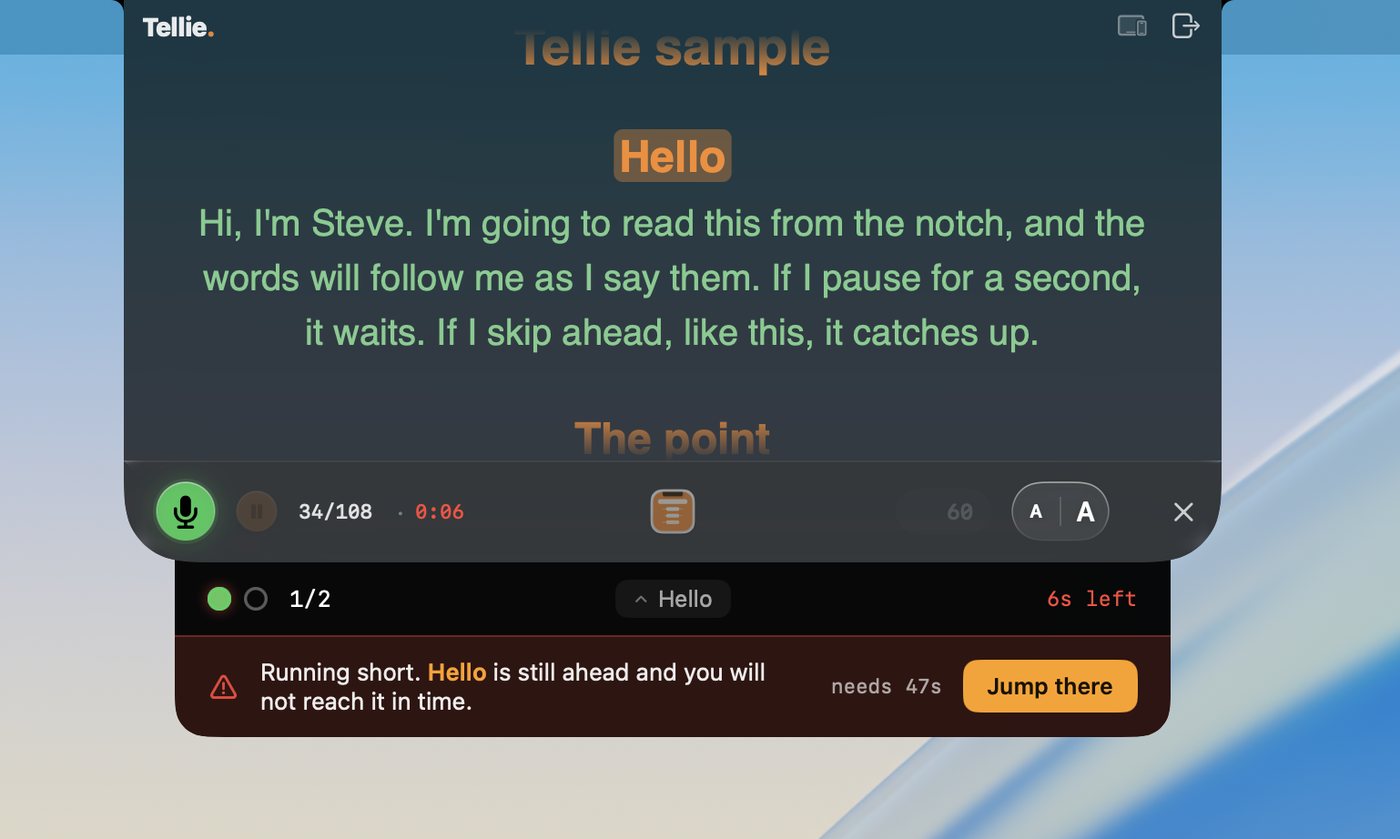
The clock is real. When your close will not fit in the time you have, Tellie warns you while you can still get there.
Stagehand PRO
The speaker before you ran long.
Mark the points the talk doesn’t work without. When the clock turns, Tellie tells you what you still have to land, and defends your closer while there’s time to get there. When you step down, an honest account: what you made, where you drifted, your real pace.
Two marks and a number: put minutes: 18 at the top and Tellie measures your real pace against the real slot.
Hidden from the room
Only you can see it.
macOS hides Tellie from screen capture, so your notes stay out of everything the audience sees. Nothing to switch on, and nothing to forget to switch off.
The projectorThe recordingThe livestream
Your deck
PowerPoint, Google Slides, a PDF, or nothing.
Tellie doesn’t touch your slides, so it doesn’t care what they were made in. Paste your talk in, mark what matters, and advance your slides the way you always have.
| Deck | Hidden from the room | Your notes appear automatically | Notes follow your slides |
|---|---|---|---|
| Keynote | Yes | Yes | Yes |
| PowerPoint | Yes | No | No |
| Google Slides | Yes | No | No |
| PDF, or no slides | Yes | n/a | n/a |
On Keynote? Presenter Magic mirrors your live speaker notes into the notch and changes them as you advance, with no pasting at all. See Presenter Magic.
“With Tellie, I am able to have more confidence in my delivery when presenting to my team. I now make eye contact with everyone, and connect deeper with people.”
Questions from speakers
More in Help, or email Steve at steve@skytech.io. He answers every message himself.
Will the audience or the recording see it?
No. On a projector you are mirroring or extending your desktop, and Tellie is excluded from screen capture and stays on the Mac's own screen. The room sees the deck, the recording gets the deck, you get the notes.
How do I keep to my slot?
Put the length at the top of your script and Tellie counts down against it, then tells you by name if a point you have not made will not fit the time remaining. Leave the length out and Tellie takes your pace from your own opening instead.
Does it work with Keynote and PowerPoint?
Keynote, yes: Tellie mirrors the live slide's speaker notes into the notch and can advance the deck as you finish each one. PowerPoint does not expose its notes to other apps on macOS, so the workaround there is to paste your talk in as a script.