 Tellie
For job interviews
Keep your key points beside the camera.
Your notes sit right under your camera, so you keep eye contact. Tellie ticks off what you came to say even when you use different words, and keeps an eye on the time so you land your close.
Each download unlocks all of Tellie Pro for 10 days. No account, no card.
Apple silicon Mac (M1 or later) · macOS 14 or later
Watch it follow an answer.
Answer it your way, the point still lands. And the runway flags your closing question before you run out of time.
How it works
Three things to prepare. Five minutes of work.
- Write your three pointsWhat they should know about you, your “tell me about yourself” story, the question you’ll ask. Paste it, or open Word, Pages or PDF.
- Mark what mattersThe one thing you must say and the question you must ask. Mark them and Tellie keeps them safe from your nerves.
- Join the callZoom, Teams or Meet. Tellie sits above it, invisible to everyone on the call.
Why interviews are different
You practiced alone. The interview is a conversation.
- Invisible to everyone on the callNot the interviewer, not the recording, not whoever gets forwarded the replay.
- It follows your words, not a speedTalk fast, slow down for the story that matters, ad-lib. Tellie waits and stays with you.
- It runs in the backgroundNo Dock icon, never steals focus. The interview keeps your keyboard, and you never click anything.
- It marks what you can’t skipThe salary answer, the “why us?”, the story only you can tell. Each one greens as you cover it.
Take Coach PRO
Know how it went before you write the thank-you note.
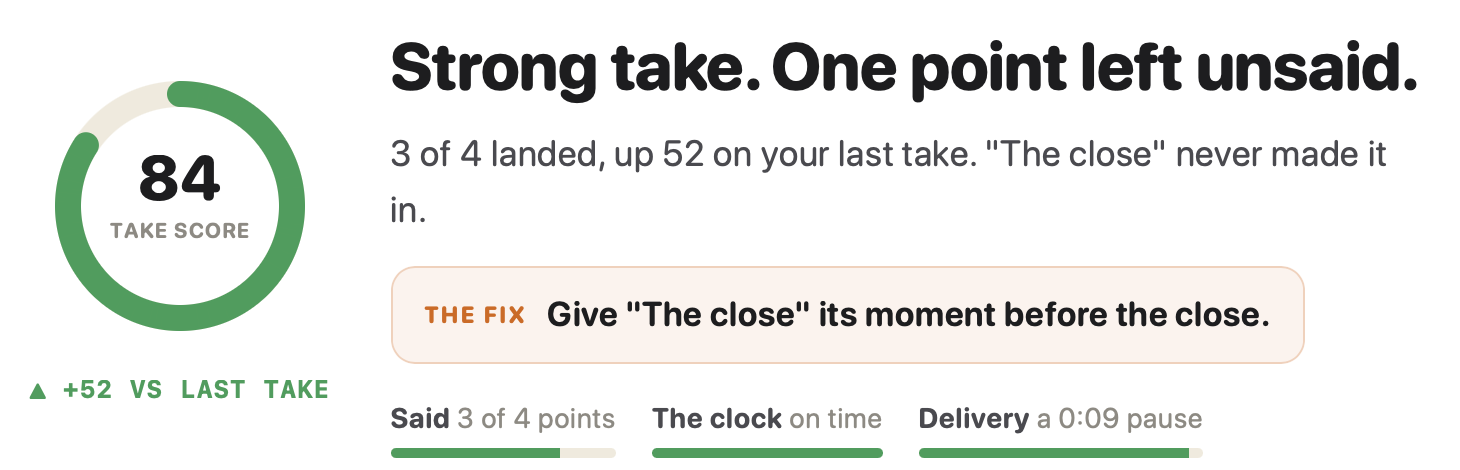
After the call: how fast you were talking, which points you covered, and exactly where you went off script. So the next interview is a decision, not a vibe.
“I now make eye contact with everyone, and connect deeper with people. I finally speak less from my notes, and more from my heart.”
“I just used Tellie on my first Casting Director Zoom workshop in 13 years.”
“Having a teleprompter that follows my speech instead of scrolling at a fixed speed is an absolute game changer.”
Stagehand PRO
Your one real question, asked in time.
Forty minutes of their questions, then “anything for us?” Mark your points and Tellie keeps the list while the conversation wanders, counts each one however you phrase it, and tells you by name, with time left, if your question hasn’t come up.
minutes: 45
# Skytech interview: My 3 points
## Why this role?
> key: problem, solved
I think I already solved your biggest problem in my spare time.
## ! Why me
> key: the same thing
My team increased product sales 40%, and I can do the same for you.
## ! My question
In six months, what will you do after I crush this role?
Your cheat sheet
No script. Just the points you must hit.
An interview is a conversation, so skip the script entirely: expand the prompter, talk like a person, and glance at what is still amber. Answer a few questions and take the sheet with you.
Every point ticks itself off when you say its phrase, in whatever words the moment gives you. Nothing you type here leaves this page. See a checklist that listens, ready to send to Tellie.
Interview questions
More in Help, or email Steve at steve@skytech.io. He answers every message himself.
Can the interviewer see my script?
No. macOS excludes Tellie's window from screen capture, so Zoom, Teams, Meet and every other video app record what is behind it. Nothing to opt out of on their end because they are never told about it. An opt-in visible mode exists for demos, and resets when you quit.
Does it work with Teams, Google Meet and Webex too?
Yes, all of them. Tellie is not integrated with any meeting app. It sits above whatever is on screen and stays out of every capture. Nothing to reconfigure when your company changes platforms or the interview moves from Zoom to Teams mid-process.
Where do I look so I still seem like I am making eye contact?
At the notch, which is where your camera already is. A prompter in the middle of the screen pulls your eyes down and the interviewer sees you reading. On a Mac without a notch, the strip sits in the same place along the top edge.
Does my script go anywhere?
No. Speech recognition runs on your Mac, and the script never leaves it: not the file you opened, not a paste, not a Send to Tellie. Route by route on the privacy page.
What if I go off script?
That is the whole point. Tellie tracks the words you actually say, not a speed you have to match. Pause for emphasis, restart a sentence, or answer in your own words, and it stays right with you. Mark the points that matter and Tellie confirms you covered them, however they come out.
Is this cheating?
Tellie is a teleprompter that follows you. It does not feed you answers or read the interviewer's screen. What it does is keep your notes private, help you stay organized during a conversation that moves fast, and make sure the things you prepared actually get said. That is not cheating. That is preparation.