Tellie / Take Coach Download Free
Take Coach · Pro beta

A coach in your corner.

Say what you came to say.

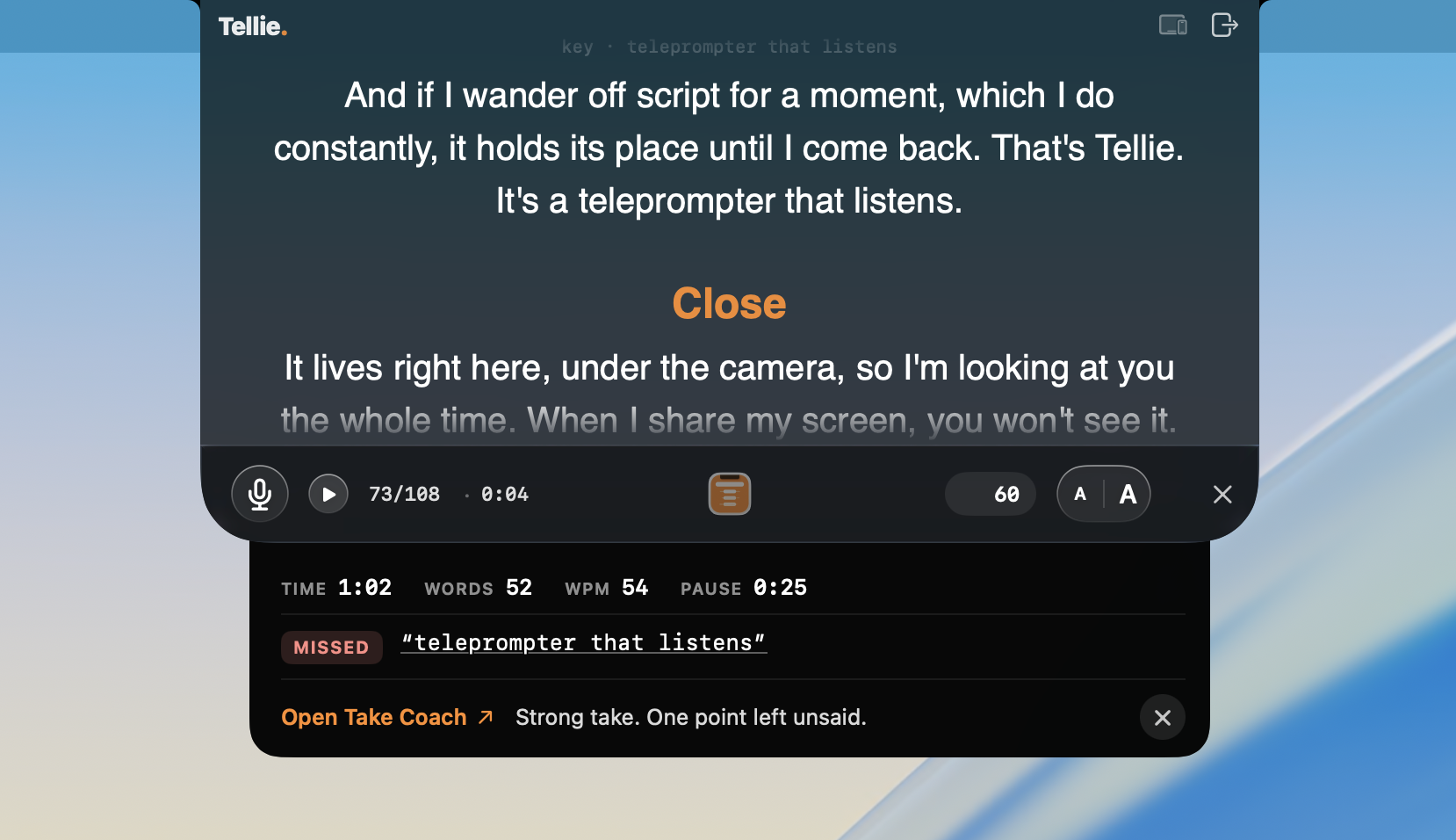
Stop the take and a quiet drawer opens under the prompter: what landed, what didn't, and the one fix.

The Take Coach drawer under the Tellie prompter right after a take: time, words, pace, longest pause, the one point left unsaid, and one line of coaching.

The Mac teleprompter is free. Take Coach is a Pro beta feature, part of the one-time $29.
10 days of Pro included, no card.

Or buy Tellie Pro now · $29 once

Open Take Coach.

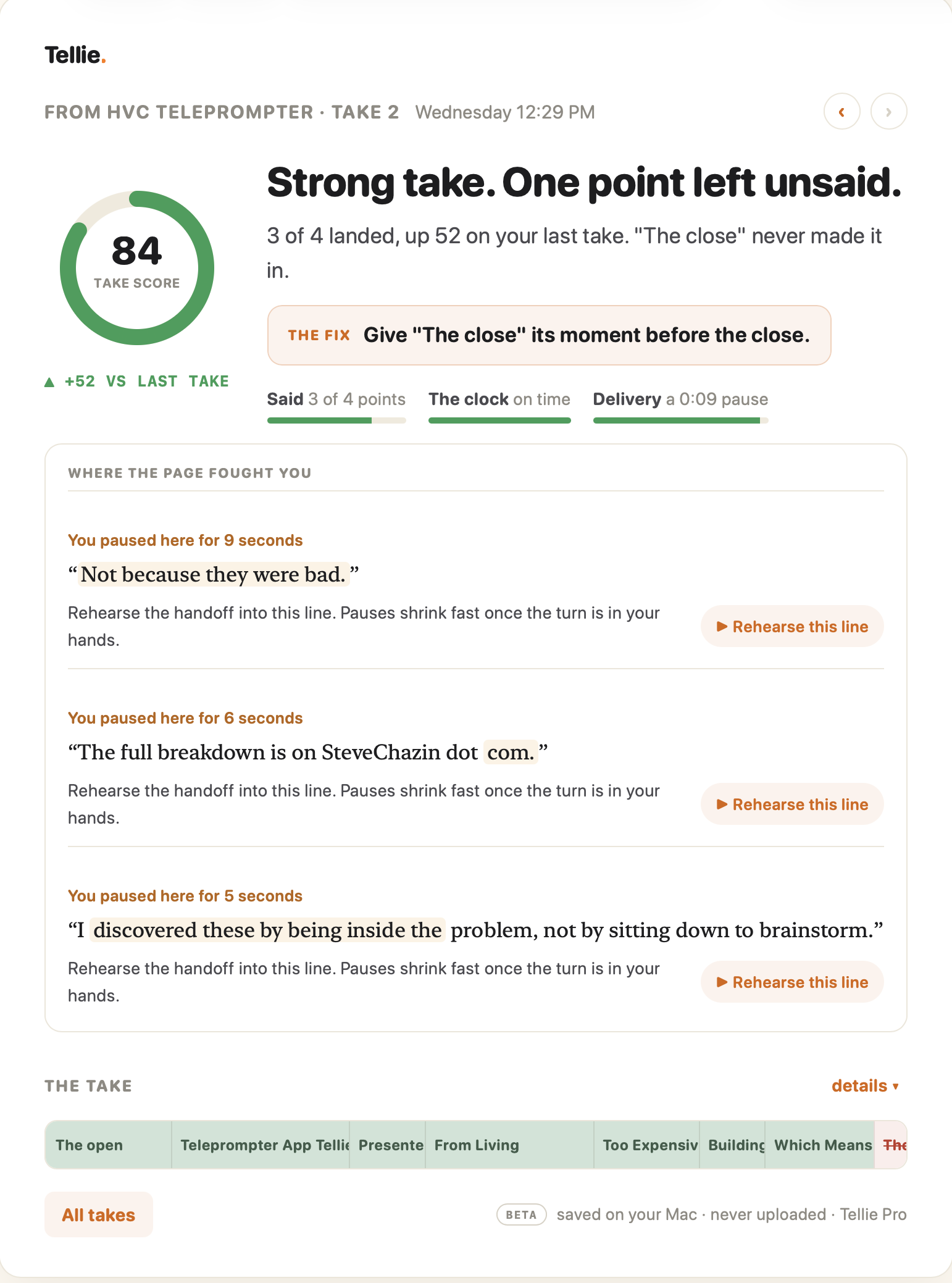
One click in the drawer opens the page for that take: the score, the verdict, the fix, and the lines to rehearse. Nothing while you speak; the coach waits until you stop.

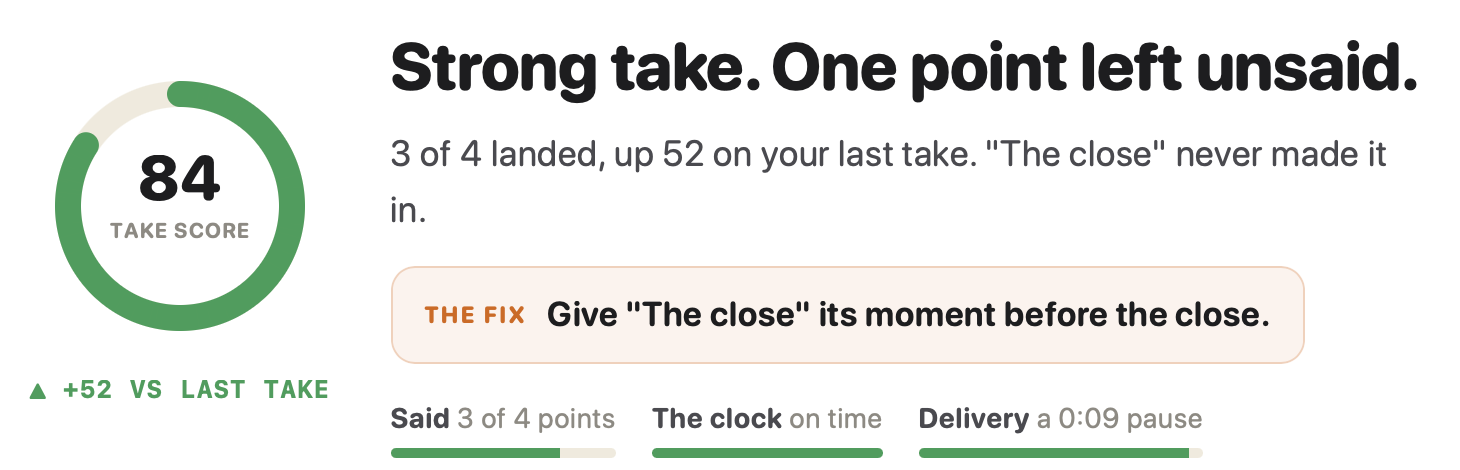
A Take Coach page in Tellie: a score of 84, the verdict Strong take, one point left unsaid, the fix, and the lines you paused on with a Rehearse button beside each.

The verdict. Then the fix.

Strong take. One point left unsaid. A score, what landed, and one thing to do next time. In a sentence, not a spreadsheet.

Take score 84, up 52 on the last take. Strong take, one point left unsaid. The fix: give the close its moment before the close.

Where the page fought you.

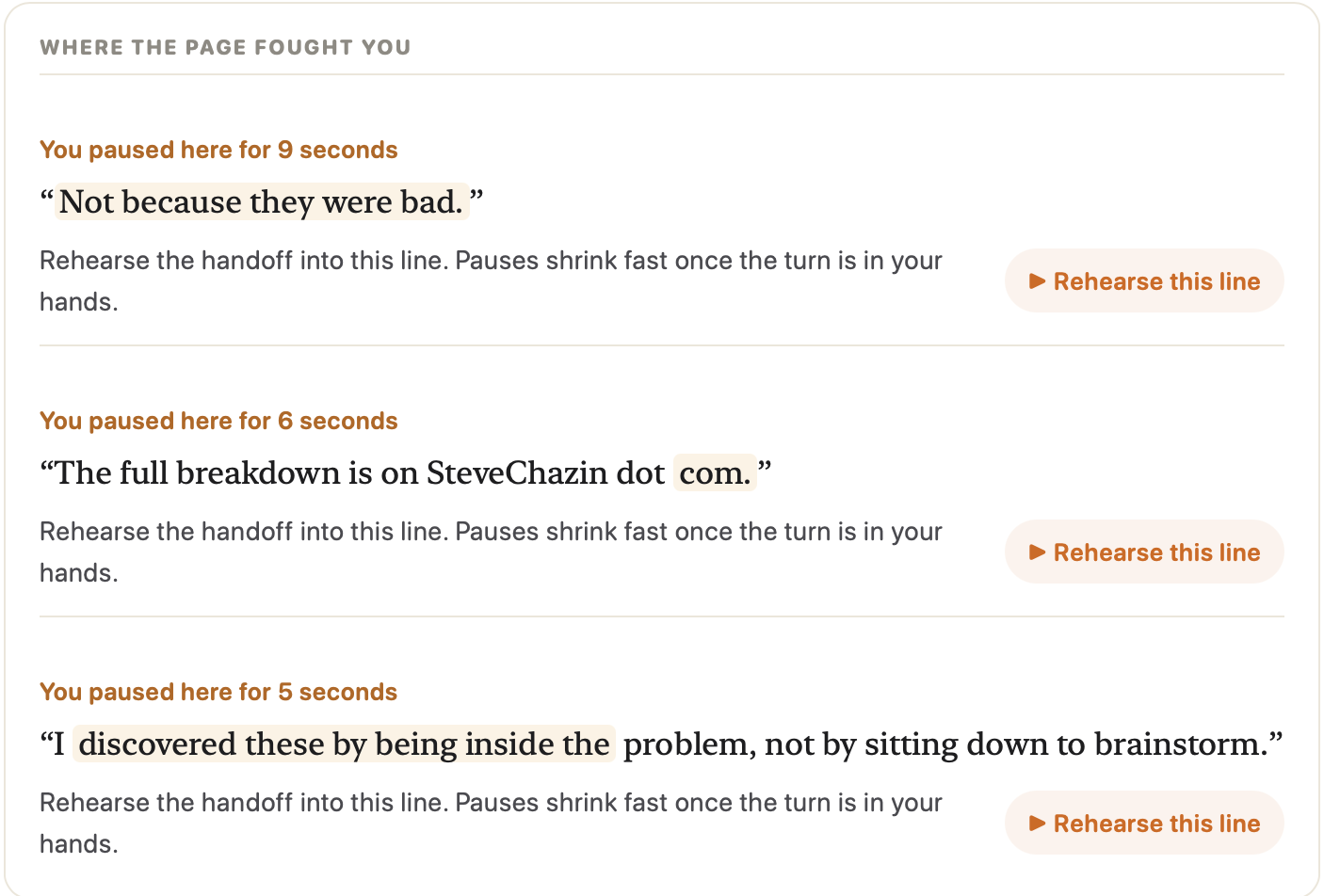
The lines you paused on, each with a Rehearse button. Ten seconds on the part that needs it, not another full run.

Three lines from the script where the speaker paused, each with the pause length and a Rehearse this line button.

The whole take, drawn.

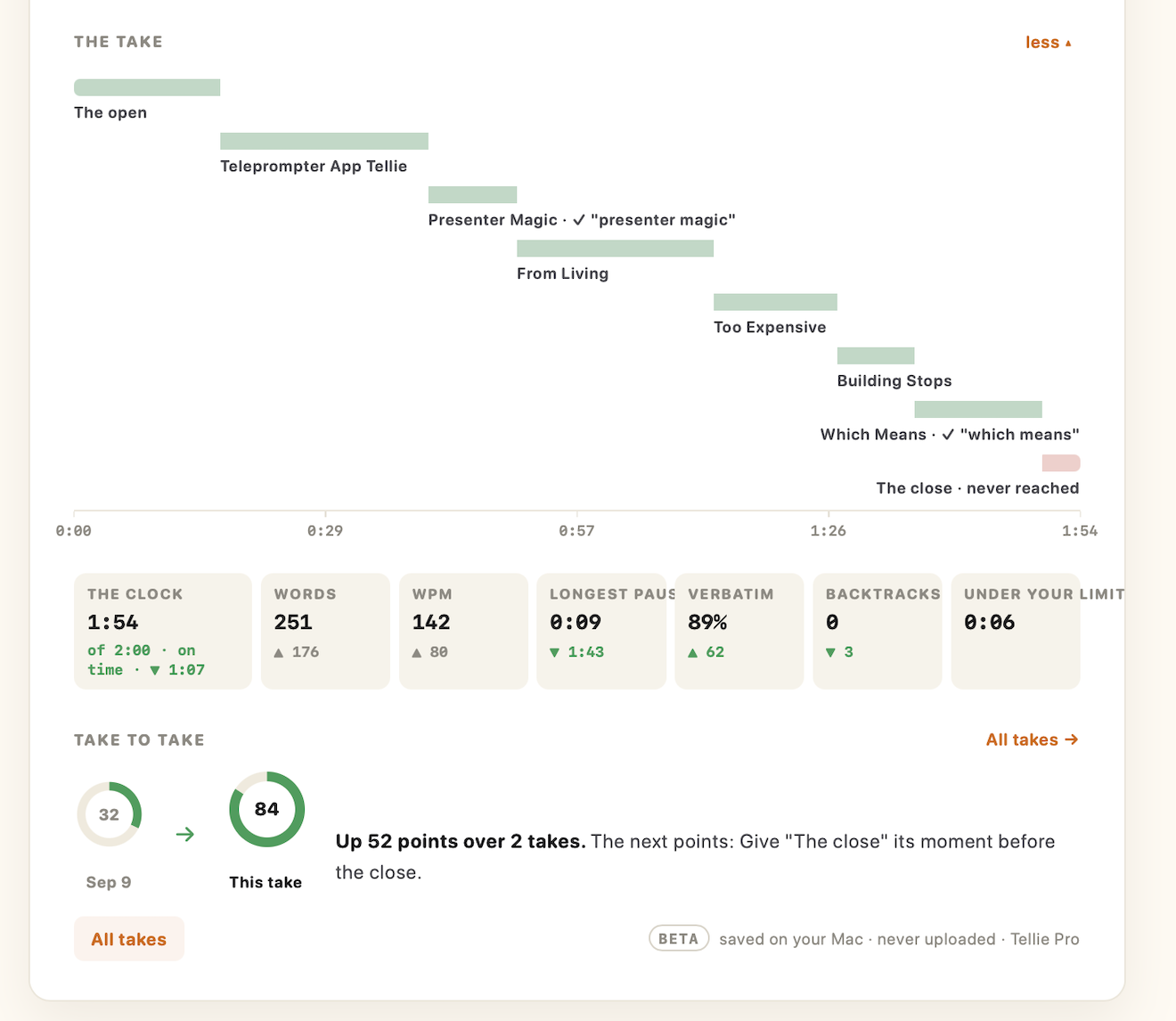
Every section on a timeline: covered, said in your own words, or never reached. Open it and the clock, words, pace and pauses sit underneath.

The take as a compact strip of sections, the close marked as never reached. The take expanded: each section as a bar on a timeline from 0:00 to 1:54, then the clock, words, pace, longest pause, verbatim share and backtracks.

Take to take.

Each take is scored against the last, with the next points to win. Watch yourself get better.

Two takes side by side: 32 on Sept 9, 84 on this take, up 52 points, with the next point to work on.

Findings, never recordings.

No audio. No transcript. Nothing uploaded. What the coach noticed stays on your Mac for 90 days, then it's gone.

Beta saved on your Mac · never uploaded · Tellie Pro

One page per take.

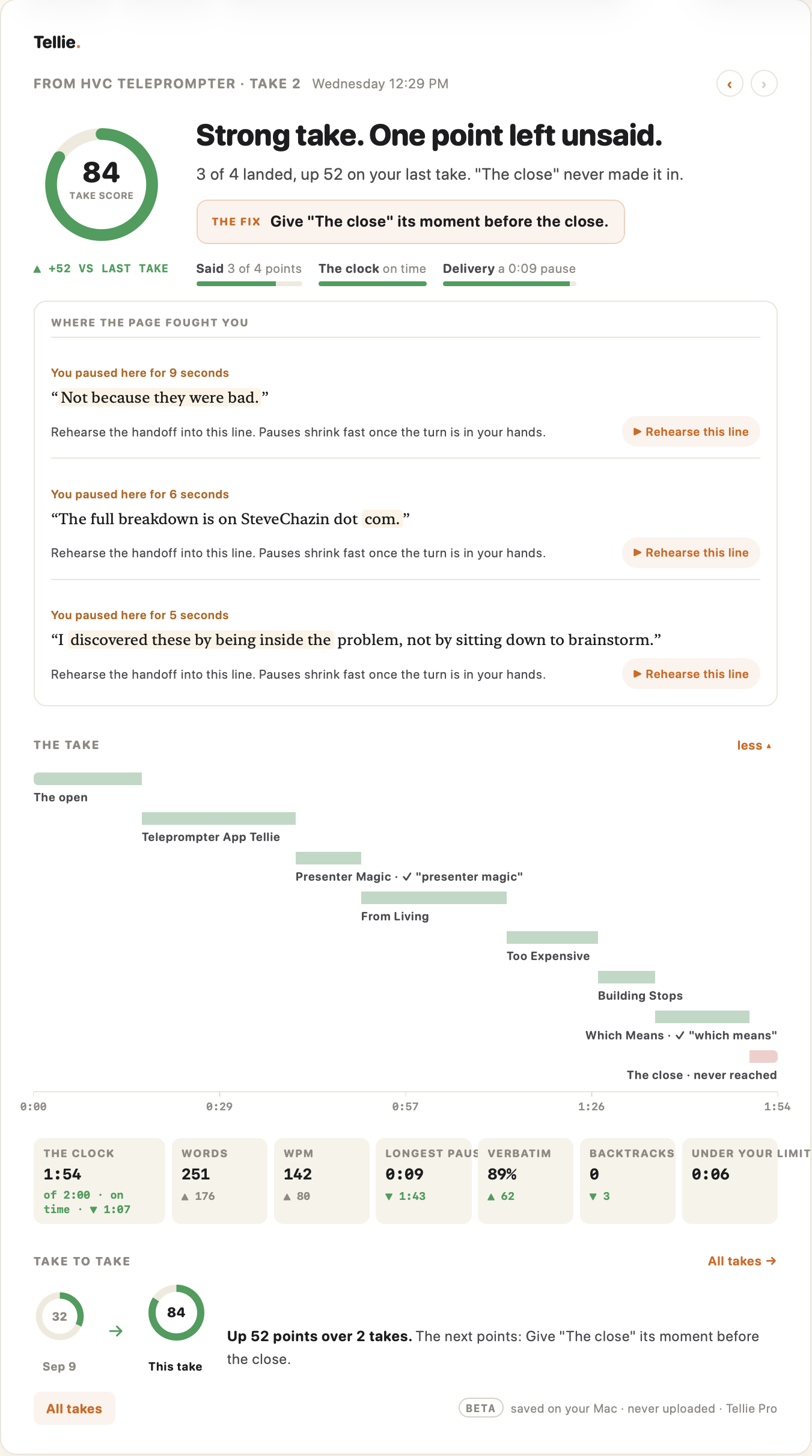
Everything above, on one page you can reread before you give the talk again.

A full Take Coach page for one take, expanded.

Take Coach, in detail.

Take Coach turns Tellie from a teleprompter into a rehearsal partner. Because Tellie follows the words you actually say rather than scrolling on a timer, it knows which points you made, whether you read them or said them your own way, where you paused, where you backed up, and which section you never reached. When you stop, that becomes a short, plain-English review: a take score, a verdict, and the single fix most likely to improve the next take.

The review is written on your Mac. It shows your real words per minute against the time you had, your longest pause, how much of the script you delivered word for word, and each line that slowed you down, with a Rehearse button that plays just that line to the end of its section and gives a verdict on the retry. Takes are compared, so a speech, a sales pitch, a lesson or a YouTube script gets measurably better with each pass.

Privacy is the design, not a setting. Tellie records no audio and keeps no transcript; what persists are findings, never quotations, and nothing leaves the Mac. Briefings are kept for 90 days so you can reread how a talk went before you give it again.
Questions about Take Coach.

What is Take Coach?

Take Coach is the feedback feature in Tellie, the Mac teleprompter. When you stop a take it reviews it on your Mac: a score, which of your points landed, your real pace and time, where you paused or went off script, and one thing to sharpen next time.

Does Tellie record my voice?

No. Tellie never records audio and keeps no transcript. Take Coach keeps findings only: numbers, which points you covered, and the coaching written from them. Nothing is uploaded; each briefing stays on your Mac for 90 days.

How is this different from a normal teleprompter?

A normal teleprompter scrolls and forgets. Tellie follows the words you actually say, so it knows which points you made, in your words or the script's, and can tell you afterwards what you missed and where the take fought you.

Can I practice a speech or presentation with it?

Yes. Rehearse a talk, a pitch, a lesson or a video script, stop, read the coach, then use Rehearse this line on the spot that gave you trouble. Each take is scored against the last, so you can see the improvement take to take.

Is Take Coach free?

Take Coach is part of Tellie Pro, in beta. Every download includes 10 days of Pro with no card; after that Pro is $29 once for up to 3 Macs. The Mac teleprompter itself stays free.

What does it need?

A Mac running Tellie 1.6 or newer on macOS 14 or later with Apple silicon, and the Take Coach switch in Settings, which is on by default with Pro.

What you need.

A Mac running Tellie 1.6 or newer, macOS 14 or later on Apple silicon. Take Coach is a Pro beta feature; the Mac teleprompter stays free. How it works, step by step →

“Tellie truly is a magnificent app.”

Sprague Theobald · Emmy-winning writer and producer

Make the next take the good one.

Download Tellie. Give a take. Read what the coach noticed.

Download Free for Mac

More: Tellie overview · Tellie Pro · Companion · Take Coach how-to