 Tellie
Scripting guide
Your script can coach you.
Three small marks turn a plain script into one that follows you: it greens what you cover, ticks off a point the moment you make it in your own words, and keeps an eye on the clock.
In brief · Updated September 2026
Stagehand reads three small marks you type into an ordinary script. Put an exclamation mark after the hashes of a heading (## ! Section name) to flag a must-cover section, and it turns green as you cover it. Under a plain heading, add a line starting with > key: followed by a phrase to name a point you want to make in your own words; say the phrase anywhere in your take and the point ticks itself off. Put minutes: 10 near the top to set your real time slot, and Tellie warns you while there is still time to finish strong. Word, PDF, and Pages files import their own headings as sections automatically, so marks are always optional. Anything in square brackets, like [pause] or [breathe], is a note to you: Tellie shows it and never waits for you to say it. Skip every mark and Tellie is still a voice-follow teleprompter.
Just a section
A place to jump to. Tab, Shift-Tab, and the number keys move between your sections.
Cover this section
The bang means this one matters. It greens as you cover it, and if the clock gets tight while it is still ahead, Tellie tells you.
Make this point
Name the phrase that matters. Say it your own way, anywhere in the take, and it ticks itself off. You never have to read the line.
Optional fourth: minutes: 10 on its own line near the top sets your real slot. And if you would rather not type anything, a Word, PDF, or Pages file brings its own headings in as sections, automatically.
See for yourself
 In Tellie
minutes: 10

# 2026 season preview

## ! Intro
> key: welcome back, new era
Welcome back. The season is finally here, and the roster changed more than anyone expected.

## The big signing
> key: franchise quarterback
A point to make in your own words. Say "franchise quarterback" however you like and Stagehand checks it off, even if you riff on the whole thing and never read this line.

## The schedule
No mark here on purpose. Worth covering, but if the clock gets tight this is the one to drop.

## ! Outro
> key: predictions, comments
Built to compete right now. Drop your predictions in the comments.
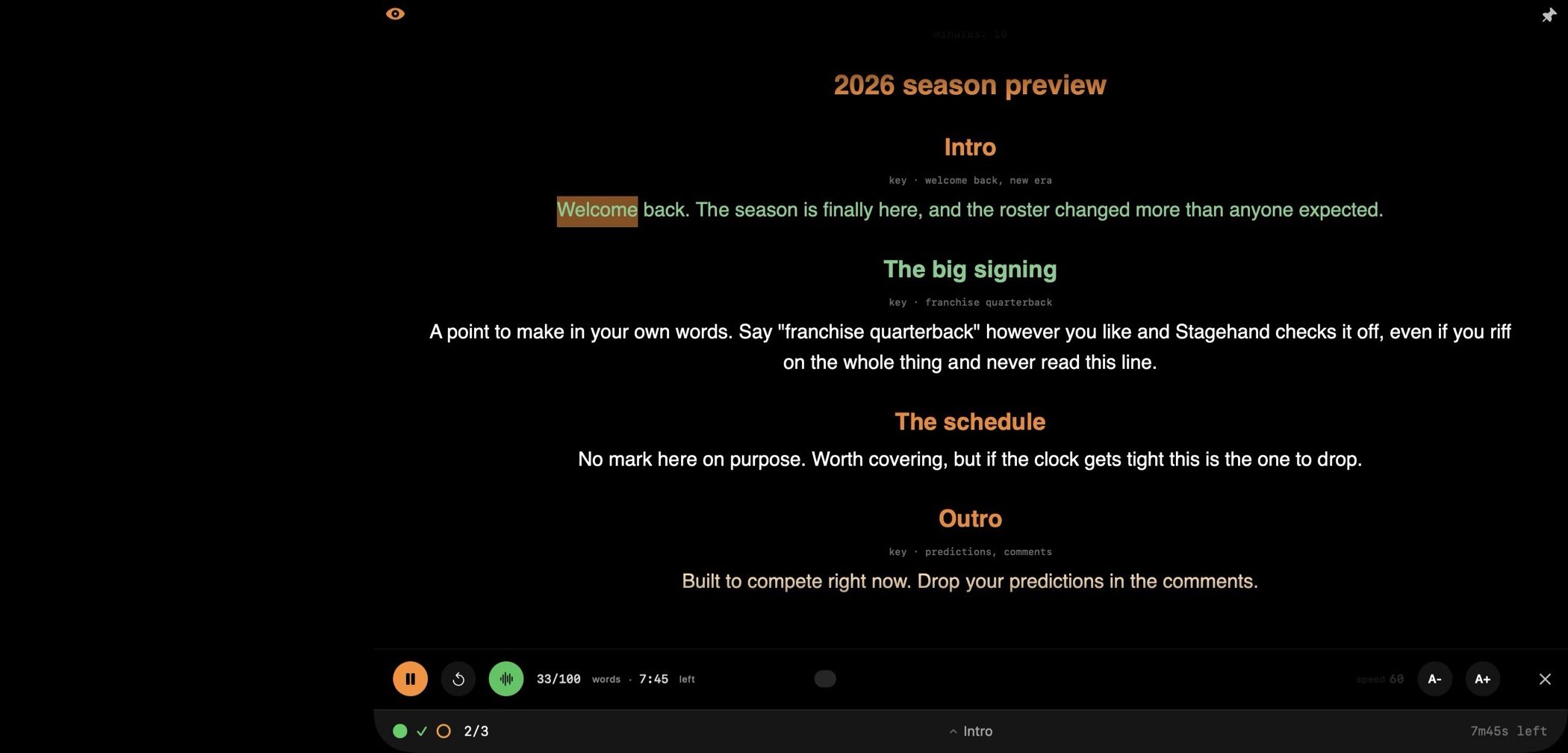
Reading the Intro greened it. Saying "franchise quarterback" out loud checked off The big signing without reading a word of it. The amber ring is the Outro, still ahead, with 7:45 left to land it.
Steal one of these
Four finished scripts, marks and all. Read one here and send it straight to Tellie, or write your own and share it as a link. More starting points in the teleprompter script templates.
Three sections, one of them must-cover. Skip the last one on purpose and watch Tellie notice.
Have your AI do it.
Copy that line and paste it to your agent along with your unformatted script. You'll get back one that will work magic with Tellie.
Read https://tellieapp.com/agent and use it to turn my script into a Tellie script.
The instructions live at tellieapp.com/agent if you want to read them yourself.
When you want to go deeper
Notes to yourself: [pause], [breathe], [smile]
Anything in square brackets is a note to you, not a word to say. Put it on its own line or mid-sentence. Emoji work too, like [📢 🐢]. Tellie shows it in soft yellow and never waits for you to say it.
## The season opener
[smile]
Welcome back. The season is **finally** here [pause] and the roster changed *more* than anyone expected.
[breathe]
Let's get into it.
In Tellie
Headings are labels too, so Tellie never waits on them. **Bold** and *italic* show as emphasis, a link reads as plain words, and the word count and reading time count only what you say.
With Nudge on, [pause] and [breathe] also keep it quiet there, and a timed [pause 3s] lets you hold that long before it helps.
Sharing the scene? Put [Actor 2] where your partner speaks (or [Actor 2: their line] to see it). Tellie holds your place there until you say your next line, so their voice can't move you on.
Numbers, and the one to list twice
Write numbers however you like. > key: 40 percent matches "forty percent", and 58,000 matches "fifty eight thousand".
The exception is a year. You might say 2026 as "twenty twenty six", so list both, separated by a comma:
## ! The year ahead
> key: twenty twenty six, 2026
Commas are alternatives, not a checklist. Saying any one of them is enough, which is also how you write a key phrase for a point you might phrase either way.
Set a time budget (optional)
Put minutes: 15 on its own line near the top, and Tellie shows a per-section finish clock and warns you against your real slot.
Leave it out and Tellie makes its own deadline: it learns your opening pace and projects the whole script from it, then warns "running long" if a must-cover section ahead will not fit. No dial to set. Writing minutes: just replaces the guess with your real number.
Make sure you reach a strong finish
Tellie's runway warning defends must-cover material that is still ahead of you. Once you have covered everything you flagged, it goes quiet. So if all your ## ! marks sit early and your strong finish is unmarked, a slow back half will not draw a warning, because nothing you flagged is still at risk.
The fix is one more bang on the last thing that matters, even if it is just:
## ! The close
Thank them, say the URL, stop talking.
Now the runway defends the whole talk: "The close is still ahead and will not fit" is exactly the nudge a strong finish needs.
Using Word, PDF, or Pages?
You do not have to write Markdown. When you open a Word, RTF, Pages, or PDF document, Tellie reads its structure for you, and bold and italic come through as emphasis (colors arrive as plain text). Nothing below requires editing your document into Markdown; the import does the translation.
| You want | In your document |
|---|---|
| Sections | Nothing to do. Your Word, RTF, and Pages heading styles, and a PDF's larger fonts, import as real sections automatically. The chapters you already have light up the navigator and Tab jump. |
| A must-cover section | Type ! as the first character of a heading. A heading reading !The close imports as a must-cover section, flag and all. The bang never shows in the prompter. (A bang anywhere else, like "We won!", is left alone.) |
| A key point | Type a plain paragraph starting > key: your phrase on its own line under the heading it belongs to, exactly as in Markdown. Under a plain heading it is a key point you say; under a must-cover heading it credits that section off-script. It imports as the quiet key chip, never as spoken text. |
| Emphasis | Nothing to do. Bold and italic come through as they are. |
| A time target | Usually unnecessary; with ## ! marks Tellie baselines your own pace. If you want a hard slot, put a minutes: line near the top of the document. |
.pages file directly. Your headings, bold, and italic come through. The first time, macOS asks if Tellie may use Pages; say OK.Grab the starter and try it
Download the ready-made script, open it in Tellie, and read. Change a few words and it's yours.
The script needs somewhere to be read. Tellie is a free Mac app, and every new install gets 10 days of Tellie Pro.