 Tellie
Follows your voice
The teleprompter that follows your voice, word for word.
Every teleprompter scrolls. The question is what makes it scroll. Most listen for sound and guess at your pace. Tellie reads your script and matches it against the words actually coming out of your mouth, and you feel the difference about ten seconds in.
Tellie Pro free for 10 days. No account, no card.
Three ways to follow
Three ways a teleprompter can follow you.
The category uses one phrase for three different mechanisms, which is why so many people buy a voice teleprompter and find it doesn’t behave the way they expected.
| Approach | What it is actually doing | Where it falls apart |
|---|---|---|
| Fixed speed | Scrolls at a rate you set, regardless of you | The moment you pause, slow down, or add a sentence |
| Sound paced | Listens for whether you are talking and adjusts speed | It knows you are making noise, not which word you are on. A long pause reads as stopped, a noisy room reads as still going |
| Word level | Transcribes what you say and matches it to a position in your script | This is the one you want |
Tellie is the third kind. That is the whole design.
Voice teleprompters for Mac
Every one says it follows your voice. Here’s how.
Each app in its maker’s own words, from their own site or App Store listing, checked October 8, 2026.
| App | How it follows you | Hidden on calls | Speech on your Mac | Next line in your ear | Price |
|---|---|---|---|---|---|
| Tellie | Matches each word you say to your script, and checks off the points you make, even in your own words | Yes | Yes | Yes, with Nudge | Free · Pro $29 once |
| NotchPrompter | “Follows your voice. Words you have said fade out.” | Yes | Yes | No | Free, open source |
| Textream | “Highlights each word as you say it” | Yes, as an option | Yes | No | Free, open source |
| VoicePrompter | “Scroll as you speak, pause when you pause” | Yes | Yes | No | Free web app · Mac from $9.99/mo |
| Moody | “Scrolls as you speak, pauses when you pause” | Yes | Yes | No | $39 once |
| CueNotch | “Every word you say is matched to the script” | Pro only | Yes | No | Free tier · $29.99 once |
| Notchie | “Voice-Sync”: pause mid-sentence and the text waits | Yes | Not stated | No | $29.99 once |
| Avocado | Voice scrolling, three free sessions a week | Yes | Yes | No | Free tier · $7.99/mo or $79.99/yr |
| PromptSmart Pro | “VoiceTrack” holds your place when you go off script | Not stated | Yes | No | $29.99 once |
| Teleprompter.com | “VoiceGlide”: follows your voice, pauses when you pause | Not stated | Yes | No | Free plan · Pro $19.99/mo |
| Speakflow | “Flow Mode”: the script waits for you | Desktop overlay, in beta | Not stated | No | Free · Plus $19/mo |
None of the others says it keeps track of the points you came to make, or gives you your next line when you lose your place. That’s Stagehand and Nudge, and it’s why Tellie follows your meaning as well as your words. Every Mac teleprompter, compared
What it feels like
What word level tracking actually feels like.
- You pause. Tellie holds at the exact word you stopped on.
- You ad-lib. Say it your own way; when you land back on the script, Tellie is already there.
- You skip. Jump a paragraph and Tellie catches up instead of scrolling you backward.
- You go again. Fluff a line and repeat it; Tellie doesn’t advance twice.
In your language, on your Mac
Listens for you, not on you.
Speech recognition runs on-device. Nothing is recorded, nothing is uploaded, and there’s no account to make.
Where you talk
It follows you where you actually talk.
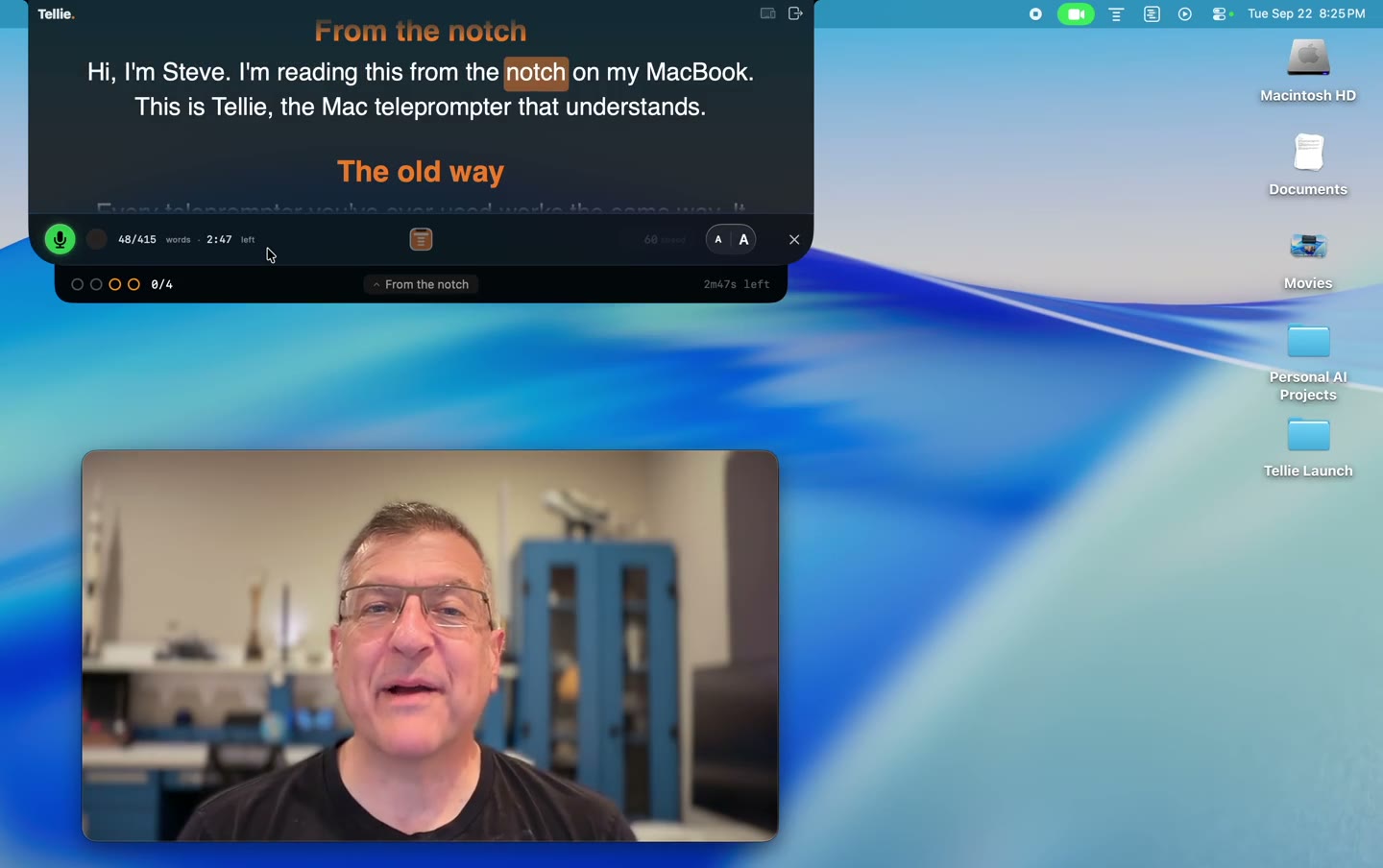
Tellie sits in the notch, right beside the camera, so following your script and looking at the lens are the same motion. It’s excluded from screen capture by macOS itself, so on a call nobody sees it, and Voice Follow keeps listening even while Zoom or Teams is the app in front.
What Tellie is not
Four things it will never be.
- Not a recorder. It doesn’t save what you said. It forgets the moment you stop.
- Not a cloud service. No server, no API call, no telemetry. Your script and your voice stay on the Mac.
- Not a subscription. Free forever as a teleprompter. Pro is $29 once, up to 3 Macs.
- Not an AI writing tool. It doesn’t rewrite your script. It follows the one you brought.
“Having a teleprompter that follows my speech instead of scrolling at a fixed speed is an absolute game changer.”
“Word level tracking is such a clever touch, following you even when you ad-lib or jump back solves the exact thing that makes normal teleprompters stressful.”
Voice Follow, answered
More in Help, or email Steve at steve@skytech.io. He answers every message himself.
What is the best voice teleprompter for Mac?
It depends on what you need. For free, NotchPrompter and Textream are open source and follow your words. VoicePrompter and Teleprompter.com are subscriptions that also run on phones. Tellie follows your words from the notch, hides on calls, keeps your speech on your Mac, and is the one that also checks off the points you came to make. It is free to download, with Pro at $29 once.
How is this different from voice activated scrolling?
Voice activated usually means the app is listening for sound and changing its scroll speed. Tellie transcribes what you say on your own Mac and matches it against the words in your document to work out which word you are on. Knowing the position is what lets it wait through a pause and catch up after a skip, instead of guessing at a pace.
Does it still work if I go off script?
Yes. Ad lib for as long as you like. Tellie holds your place, and the moment you say something that appears in your script it picks up from there. With Stagehand marks it will also credit a point you made in your own words, not only the lines you read.
Does my voice leave my Mac?
No. Speech recognition runs on-device. Nothing is recorded, nothing is uploaded, and there is no account.
Which languages does it support?
More than 40 languages and regional variants.
Is Voice Follow free?
Tellie is free forever as a teleprompter. Voice Follow is part of Tellie Pro, and every download includes 10 days of Pro with no card and no sign up. After that Pro is $29 once, never a subscription, for up to 3 Macs.